![Nojumi_Logo_Screen_RGB.png]](https://help.nojumi.com/hs-fs/hubfs/Nojumi_Logo_Screen_RGB.png?width=200&height=70&name=Nojumi_Logo_Screen_RGB.png)
The Matters I Manage Page is meant to help you stay on top of your matters.
To access the Matters I Manage page,
-
In the sidebar, click on Matters
- Click on Matters I Manage
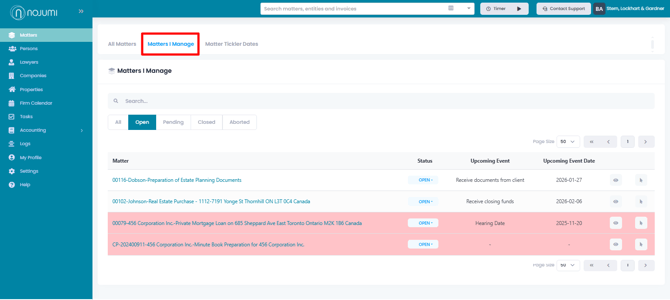
The matters that are shown as red on the Matters I Manage page, are those that don't have a tickler date that has not passed yet. For these matters, you should browse the matter calendar page and add a new date of type "tickler date" for some time in the future. Once you do that, the matter will no longer show in red on the Matters I Manage page until the latest tickler date you add lapses.