![Nojumi_Logo_Screen_RGB.png]](https://help.nojumi.com/hs-fs/hubfs/Nojumi_Logo_Screen_RGB.png?width=200&height=70&name=Nojumi_Logo_Screen_RGB.png)
1. In the sidebar, click on matters.
2. Click on advanced search.
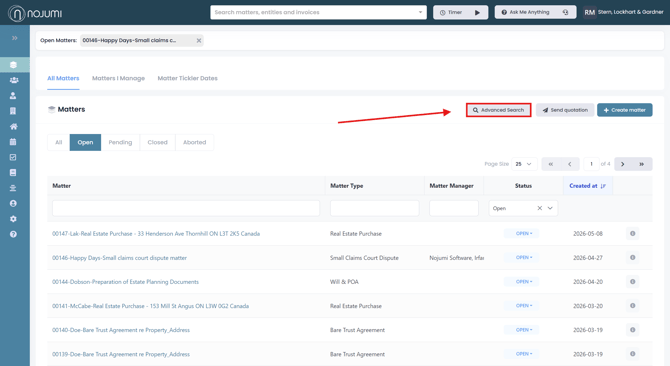
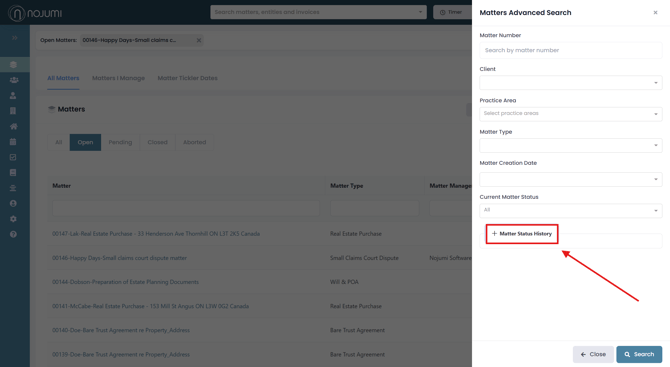
3. Here, you can enter matter details such as the matter number, client, practice area, matter type, creation date, and current status. Clicking on ‘Matter Status History’ will open an additional dropdown showing more details about the matter timeline.
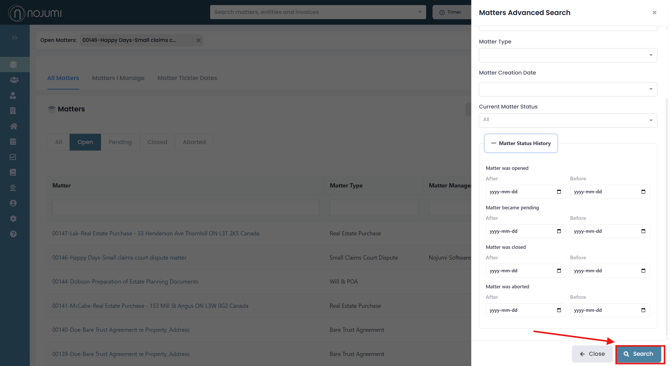
4. Within the Matter Status History section, you can enter date ranges for when the matter was opened, became pending, was closed, or was aborted. Once you have entered the desired information, click ‘Search.’
Adjusting the Search Criteria
When performing an advanced search, you can set one or more of the following criteria:
- Matter Number - You can enter a single matter number if you are looking for a specific matter.
- Client - You can select one or more clients. If you select more than one client, the results will only include matters that have all of the selected entities as their clients.
- Practice Area - You can select one or more practice areas. If you select more than one practice area, the results will include matters in either of the selected practice areas.
- Matter Type - You can select one or more matter types. If you select more than one matter type, the results will include matters with either of the selected matter types.
- Matter Creation Date - You can select a matter creation date range. If you select a date range, only matters created within that date range will be displayed.
- Current Matter Status - You can select a current matter status. When you select a current matter status, only the matters that currently have that status will be shown.
- Matter Status History - You can select date ranges for the matter status changes. When you do this, only matter whose status changed within the date range are shown. Specifically, are able to set the following:
- Matter status was changed to open
- Matter status was changed to pending
- matter status was changed to closed
- matter status was changed to aborted
When more than one of the above criteria is set by the user, they are considered in conjunction with another, and results that meet all of the selected criteria will be displayed.