![Nojumi_Logo_Screen_RGB.png]](https://help.nojumi.com/hs-fs/hubfs/Nojumi_Logo_Screen_RGB.png?width=200&height=70&name=Nojumi_Logo_Screen_RGB.png)
Time Entries
Nojumi keeps track of all billable and non-billable time entries added by the users of your law firm to matters.
For billable time entries, Nojumi tracks the following for every user
- total unbilled time entries of that user
- total billed time entries
- total billed and collected time entries
- total time enties written off
In other words, for every user of your firm, for any given period of time, you will be able to see how much time they have logged, how much of that time has been billed and how much of the time has already been paid for by the client, and how much has been written off.
Tasks
When you complete a task that is marked as billable, a billable time entry equivalent to the duration of the task is added to the Entries tab of the matter. If you undo the task, the time entry is removed. As a result of this, completed tasks will also impact the performance of the user.
Where to find your performance report
To see your performance report
- On the sidebar, click on Tasks and click on the Performance tab
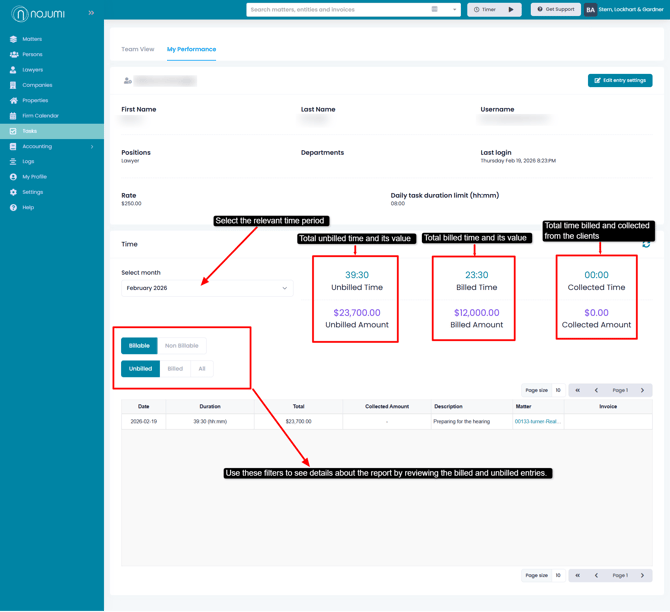
- Select the time period of interest
- Review the report
- Unbilled Time - This shows all billable time that has been entered but not billed for the user or the total work in progress for the user.
- Unbilled Amount - This is the dollar value of the unbilled time.
- Billed Time - This shows all billable time that has been billed, whether or not the bill has been paid
- Billed Amount - This is the dollar value of the billed time.
- Collected Time - This shows all the billed time that has been paid for by the clients.
- Collected Amount - This shows the dollar value of the collected time.