![Nojumi_Logo_Screen_RGB.png]](https://help.nojumi.com/hs-fs/hubfs/Nojumi_Logo_Screen_RGB.png?width=200&height=70&name=Nojumi_Logo_Screen_RGB.png)
Set your own hourly rate
To set your own hourly rate
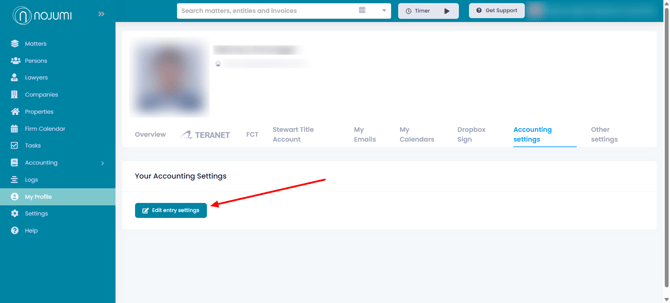
- Click on My Profile on the sidebar
- Click on the Accounting settings tab and click on Edit entry settings
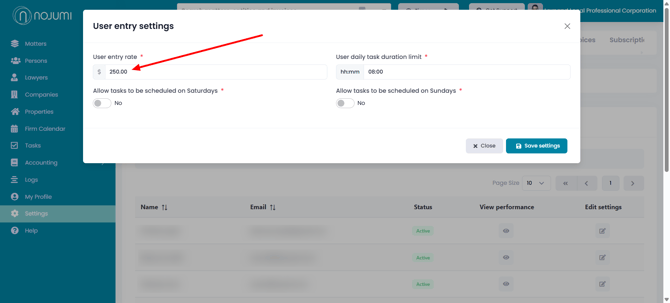
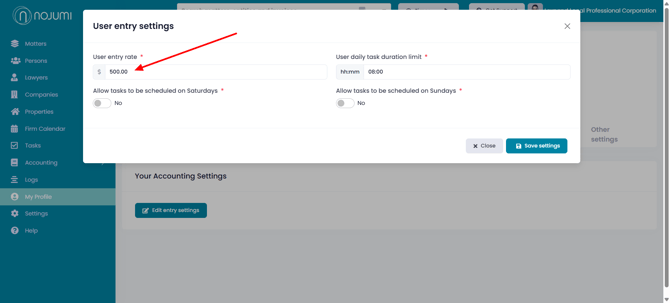
- Enter your hourly rate and click on Save Settings
Set another user's hourly rate
If you are an admin user, you can also set the hourly rate of other users. To set the hourly rate of another user,
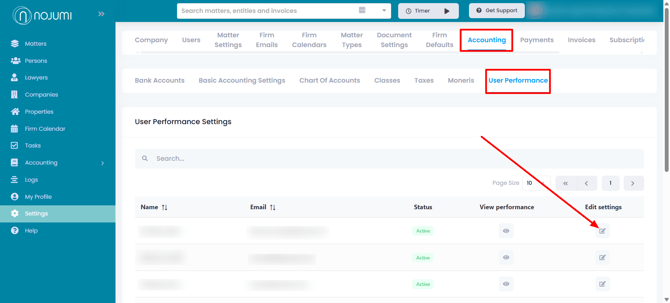
- Click on Setting on the sidebar
- Click on the Accounting tab, click on the User Performance tab and click on the edit icon next to the user whose hourly rate you wish to set
- In the modal that appears, enter the hourly rate of the user and click on Save settings