![Nojumi_Logo_Screen_RGB.png]](https://help.nojumi.com/hs-fs/hubfs/Nojumi_Logo_Screen_RGB.png?width=200&height=70&name=Nojumi_Logo_Screen_RGB.png)
After sending an appointment booking link to a recipient, you can edit and manage the booking link from within a matter using the matter calendar page.
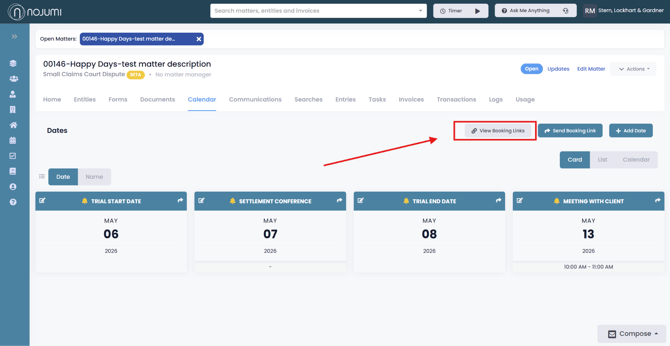
- Open the matter homepage
- Click on the calendar tab
- Click on “View Booking Links"
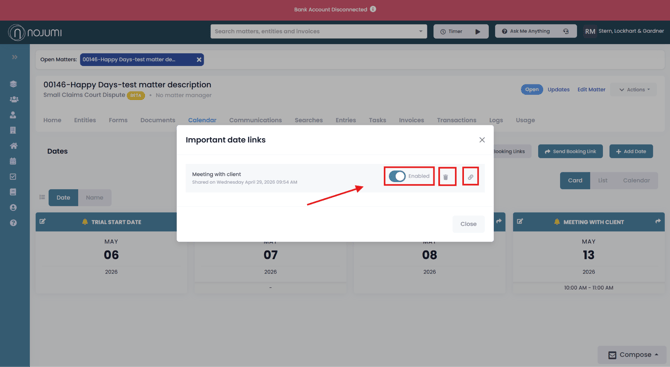
- Here, you’ll see a list of all your booking links. Using the buttons on the right-hand side, you have the ability to enable/disable a link using the toggle (disabling does not delete it—it temporarily removes it from your availability so that time can be booked for something else), delete it by clicking the trash icon, or copy it by clicking the link icon.
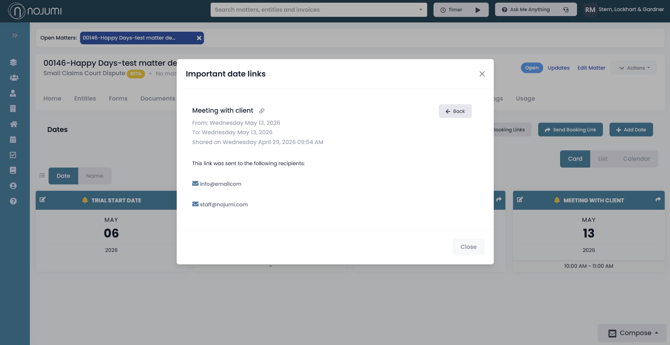
- Click on the booking link title to view more details. This will show you the emails the link was sent to and when it was shared.