![Nojumi_Logo_Screen_RGB.png]](https://help.nojumi.com/hs-fs/hubfs/Nojumi_Logo_Screen_RGB.png?width=200&height=70&name=Nojumi_Logo_Screen_RGB.png)
Power of Attorney for Personal Care
A Power of Attorney for Personal Care allows someone to make personal or healthcare decisions on your behalf only if you become unable to make those decisions yourself. While you are healthy and capable of making your own choices, the document has no effect and you remain fully in control of your personal care decisions.
Power of Attorney for Property
A Power of Attorney for Property allows someone to make financial or legal decisions on your behalf. Depending on how it is set up, it can be used while you are still capable of making decisions or only if you become unable to manage your own affairs.
How to add attorneys within Nojumi
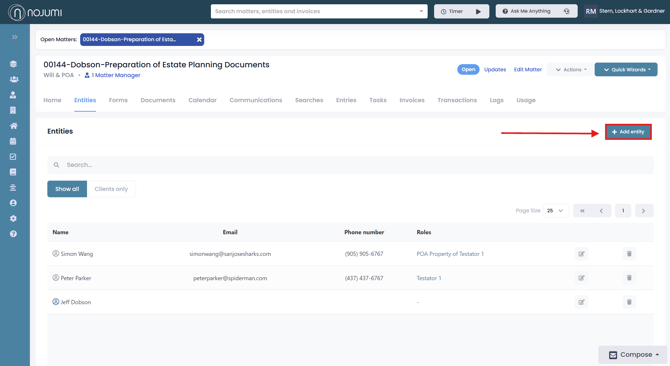
1. Go to the Matter Entities Page, and click "Add Entity"
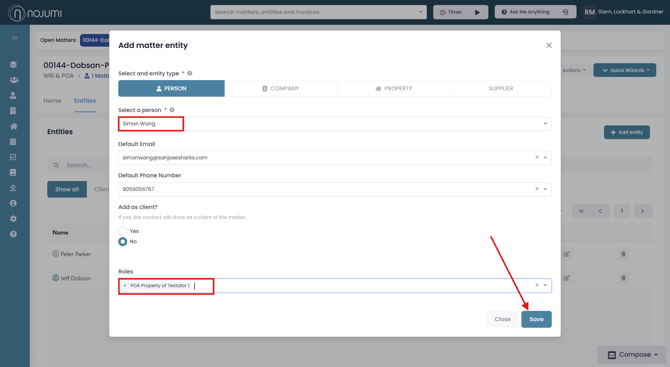
2. Enter the name of the person you wish to add as an attorney, then for a Power of Attorney for Property under role select "POA Property of Testator 1" or "POA Property of Testator 2", and for Power of Attorney for Personal Care under role select "POA Personal Care of Testator 1" or "POA Personal Care of Testator 2". Here you may also set a default email or phone number for the entity. When you are finished click "Save".
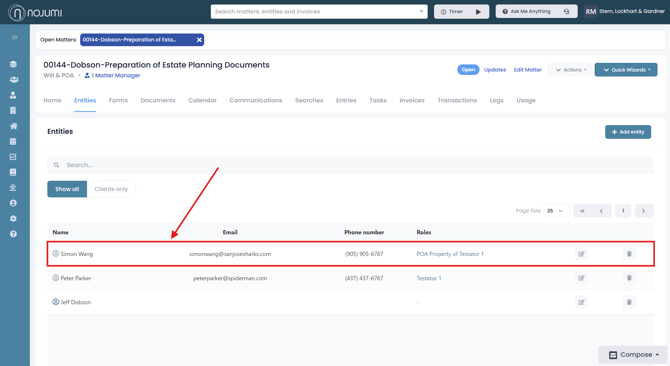
3. Once you save the entity, it will appear listed on the matter entities page, where you can edit or delete the attorney at any time.