![Nojumi_Logo_Screen_RGB.png]](https://help.nojumi.com/hs-fs/hubfs/Nojumi_Logo_Screen_RGB.png?width=200&height=70&name=Nojumi_Logo_Screen_RGB.png)
The steps for adding a testator's assets are as follows.
1. Open the Wills and POAs form.
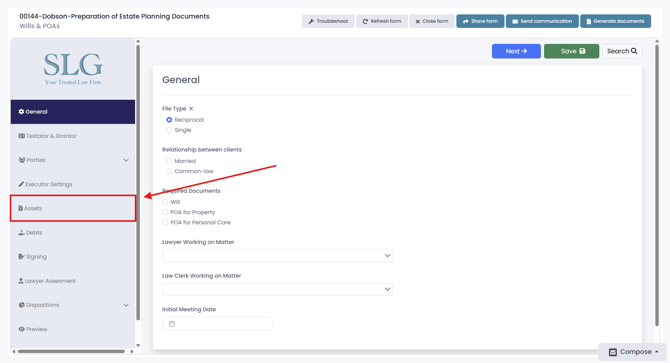
2. Click "Assets".
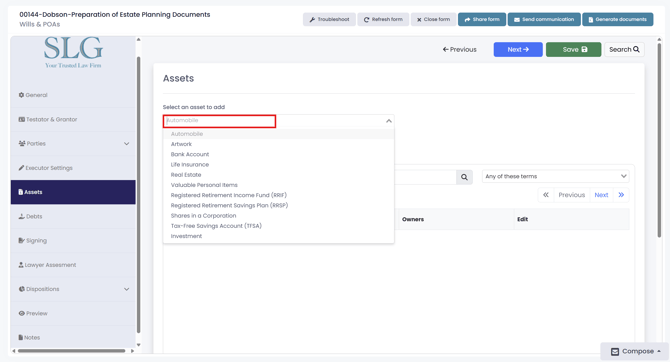
3. Click "Select an asset to add" and choose the appropriate asset type.
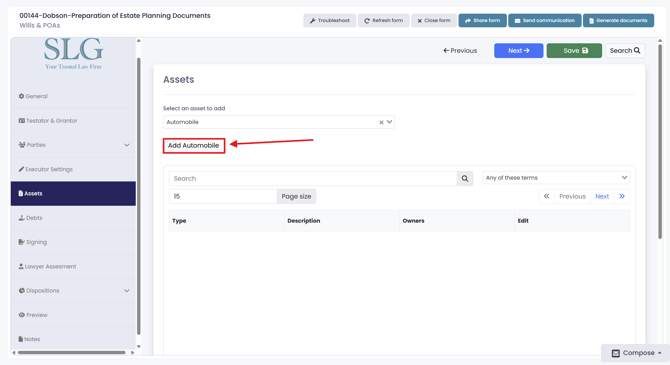
4. Click the add button.
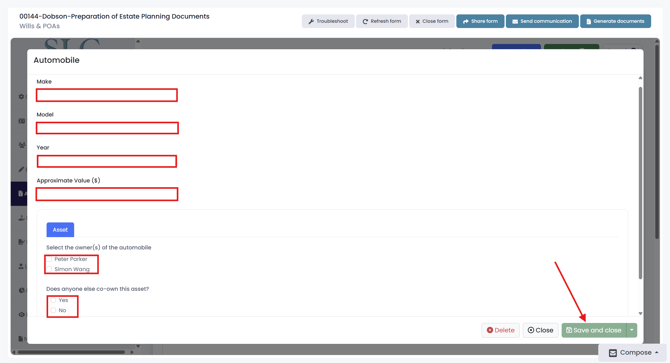
5. Complete the required information for the asset, then select the testator or testators who own the asset. Note: The required fields may vary depending on the asset type selected, but you will always need to identify the owner or owners of the asset. When finished click "Save and close"