![Nojumi_Logo_Screen_RGB.png]](https://help.nojumi.com/hs-fs/hubfs/Nojumi_Logo_Screen_RGB.png?width=200&height=70&name=Nojumi_Logo_Screen_RGB.png)
Below is the step-by-step process:
1. Go to Accounting and open the Invoices page..png?width=670&height=366&name=Invoices%20(6).png)
2. Locate and click on the specific invoice you need to adjust.
3. Click the Add Adjustments button, then select Add Adjustment from the dropdown menu..png?width=670&height=366&name=Invoices%20(8).png)
4. Choose whether you want to write off a Custom Amount or the Entire balance of the invoice..png?width=670&height=366&name=Invoices%20(9).png)
5. Depending on the amount you select, the system will display a detailed breakdown showing how the adjustment will impact the timekeepers who worked on the matter.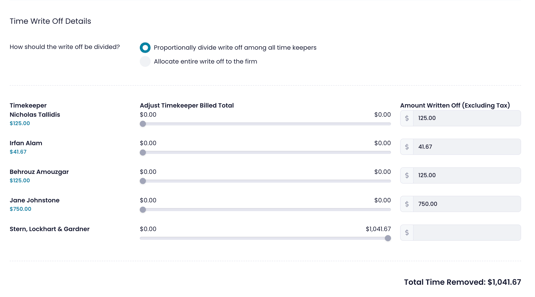
6. Choose how you want the adjustment to be divided to best reflect performance:
-
Proportionally: Divide the adjustment among all timekeepers based on their billed work. (This ensures individual metrics accurately reflect the final collected value).
-
Allocate to Firm: Apply the entire adjustment to the firm's overhead, leaving individual timekeeper metrics untouched.
7. Once you have finalized the division, press Save Adjustment in the top right corner.